
This work is licensed under a Creative Commons Attribution-Noncommercial-Share Alike 3.0 United States License.
Copyright © Cay S. Horstmann 2010, 2012
This work is licensed under a Creative Commons
Attribution-Noncommercial-Share Alike 3.0 United States License.
cd, mkdir, and
find commandsEstimated time: Two 40-minute sessions
This lab continues from lab 2. If you finished lab 2, just continue
working with your project. If you did not finish lab 2, start with this code and make it into a project
Lab4, following Step 1 of these
instructions. You will also need the file deptdir.txt.
Build the program in NetBeans (Run → Build Main Project from the main menu).
Open a shell window. Run
java -classpath /path/to/project/build/classes AddressBookDemo /path/to/deptdir.txt
where you need to supply the correct path to the directory holding the
NetBeans project and the deptdir.txt files.
If you get an error that the Java command was not found,
you need to set your path in .bash_profile. See Lab 3.
What is the command line that you used to launch the program? (Tip: You may be able to paste it from your previous lab report.)
What happens? Why? (You'll need to read through the source code.)
Ok, we'll need to implement the remove method.
remove Methodget and
put in ArrayListAddressBook. With your buddy,
formulate a plan for implementing remove.
What is the pseudocode for your plan (i.e. as a mixture of English and Java)?
You can call one of two remove methods of the ArrayList class.
From your prior programming experience, what kind of
error do you and your buddy think you are most likely to make when
implementing the remove method?
remove method, but first you need to know how to implement
a test class.
In the shell window, run the command
ls /path/to/project
where you substitute the path to the base of your NetBeans project, such
as /home/cay/cs46b/lab4 or
/cygdrive/c/Users/Fred/Desktop/lab4
What exact command did you issue?
If the files didn't include src/ and build/,
you didn't do it right. Keep trying...
mkdir /path/to/project/test
This command makes a new directory.
How can you check that the directory was created correctly?
test folder that you just createdRight-click on the test folder in the NetBeans projects
pane. Select New -> Other -> JUnit -> JUnit
Test(but not Test for Existing Class).

Click Next.
JUnit is the most commonly used framework for testing Java code. It is a very simple testing framework, but, as Martin Fowler said: “Never in the field of software development was so much owed by so many to so few lines of code.”
In the next step, give the class name
ArrayListAddressBookTest. The convention for
a test class is to have the name of the class that is being tested, with
the suffix Test.

Click Finish. Finally, select JUnit 4 from this dialog:

What happened after you clicked
Select?
@Test
	 public void anEmptyDirectoryHasNoFred()
	 {
	 AddressBook dir = new ArrayListAddressBook();
	 assertNull(dir.get("Fred", "Phone"));
	 }
Note two things:
@Test is an annotation—something you
can add to a method, field, or class to make some processor (in this
case, the JUnit test framework) take some action. JUnit will run all
methods that you annotate with @Test. It won't run other
methods. (It assumes that those are your helper methods.)assertNull method is a static method of the class
org.junit.Assert. The static import statement
at the top of the test class says it's ok to omit the
Assert class name. This method checks that the parameter
is null. If it isn't, it tells the framework and...you'll
see soon what happens in that case.Right-click on the
ArrayListAddressBookTest class and select
Run File.
What happens?
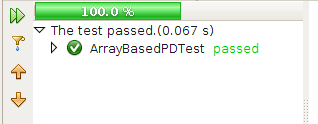
It is very easy to (a) add more tests and (b) re-run the tests every time you change your code. If the bar stays green, be happy. If it turns red, be happy too—it is much easier to fix a bug that you know how to reproduce than one that occurs in the wild.
remove methodTo write a test, come up with a descriptive method name and annotate it
with @Test. Then put in some actions that should pass.
Start with the bread-and-butter scenario first. Remove an entry that is present and see that it is no longer there. Follow this outline:
Assert class of the JUnit
API.What is the code of your test method?
Your unit test can only use the public API of the class that is being tested. (Ok, technically, public or package-visible...) That's still better than the tests that we ran in the previous lab. Those tests were only able to use the user interface that the program made available to human users.
remove method. It returns a value.
What is that value supposed to be? Write a test that checks that the
correct value is being returned.
What is the code of your test method?
This exercise shows one value of TDD. Writing a test case forces you to understand all aspects of the task that you are about to implement, before you start implementing it.
What is the code of your test method?
ArrayListAddressBookTest class again and
select Run File.
What happens? Why?
remove method,
following your plan of part B.
What is the code for your remove
method?
Did all of your tests pass? If not, which ones failed?
Do you know that your code is now correct?
remove method of the ArrayList class is not very efficient. It moves all entries beyond the one being
removed:
A B C X D E F →
A B C D E F
Since you don't care about the order, you could just move the last entry into the slot to be removed:
A B C X D E F →
A B C F D E
Reimplement your remove method, using that implementation
strategy.
What is the code for your remove method
now.
Did all of your tests pass? If not, which ones failed?
This is when a unit test suite shines. If you have the tests available, you are more likely to improve your code since testing it is so easy.
For example, let us temporarily change the contract for
remove, requiring that it throws a NoSuchElementException
if you remove a non-existent entry.
Change the implementation of your remove method
What is the code for your remove method
now.
Did all of your tests pass? If not, which ones failed?
Fix any failing tests before you go on.
What is the code for your test case?
catch clause, which is really tedious).
The designers of JUnit thought of this. Read through the documentation of the Test annotation.
What do you do to fix up your test case?
public class ArrayListAddressBookTest
	 {
	 private AddressBook dir;
	 ...
	 }
You need to initialize it somewhere. Look at the
ArrayListAddressBookTestclass again. When NetBeans created it,
it provided several methods for you.
What are they?
@Before. That method is run before every test case.
@Before
	 public void setUp()
	 {
	 dir = new ArrayListAddressBook();
	 }
Reimplement your ArrayListAddressBookTest class in this
way. Remove all local variables of type AddressBook or
ArrayListAddressBook. Use a shared instance variable, and
initialize it in the @Before method.
What is the code of your
ArrayListAddressBookTest class?
Did all of your tests pass? If not, which ones failed?
Fix any failing tests before you go on.
setUp to another name such as
initialize or foo. Re-run the test class.
What happens? Why?
There are three other annotations. @After can be used to
undo the effects of @Before. This is commonly used when
testing file or database code. In the @Before method, you open
a file or establish a connection, and you close it in the
@After method. The @BeforeClass and
@AfterClass methods are useful for doing setup that is
required by multiple tests and doesn't need to be repeated before each
individual test.
@Before. Suppose
that many of your tests want a dictionary that contains all entries of
deptdir.txt. Add an instance variable deptDir to
the ArrayListAddressBookTest class and add the code to load
the entries:
@Before
	 public void setUp()
	 {
	 dir = new ArrayListAddressBook();
	 deptDir = new ArrayListAddressBook();
	 deptDir.load("deptdir.txt");
	 }
Also add a test case
@Test
	 public void deptDirContainsHorstmann()
	 {
	 assertNotNull(deptDir.get("Horstmann", "Phone"));
	 }
Run the test class. Does the new test case pass? If not, why not?
Read the source code of get if you aren't sure.
get doesn't find
deptdir.txt. Sadly, the method then silently makes an empty
directory. This is actually very poor design that you should not do in your
own code. Hiding a failure is always bad.
Ok, let's put the deptdir.txt file into the the
/path/to/project/test directory, using the command line to get
more command line practice. Use the cp (copy) command. In its
simplest usage, it has the form
cp sourceFile targetDirectory
What command did you use?
If you did this successfully, NetBeans will show the
deptdir.txt file in the project tree.
IDEs are wonderful, but they do things behind your back all the time. This is one reason to learn about command-line tools. Command-line tools give you much more control, and they act in a more predictable way.
When the Java runtime executes the statement
Scanner in = new Scanner(new File(source));
and source is a relative path (i.e. one not
starting with / or, in Windows, a drive letter followed by a
colon), then it is evaluated relative to the “user
directory”. That is normally the directory from which a program
was started, but it is possible to change it. NetBeans changes it to the
root of your project, as you can verify by adding
System.out.println(System.getProperty("user.dir"));
into the setUp method.
Add the print statement and run your test class again. What directory is displayed?
load so that
the deptdir.txt file can be properly located?junit-4.10.jar from http://github.com/KentBeck/junit/downloads
Using shell commands, make a directory
/path/to/project/lib and copy the JUnit JAR
file into that lib directory. As always, replace
/path/to/project with the path on your system.
What shell commands did you use?
cd command, change to the base directory of the
project (i.e. /path/to/project). Then issue the command
find .
That is, the command find followed by a space and the
period.
The period denotes the current directory.
What output do you get?
Your output should show a directory hierarchy with directories
src, test, lib, and
build. If not, you didn't do the previous step correctly.
ArrayListAddressBookTest class?Use this command line
java -classpath build/test/classes:build/classes:lib/junit-4.10.jar org.junit.runner.JUnitCore ArrayListAddressBookTest
However, on Windows, replace the colons with \; (semicolons
escaped with a backslash).
In Windows, a colon is a drive letter separator, and
Windows-based programs (such as javac.exe) use a semicolon as
a path separator. But in bash, a semicolon separates commands. For example,
cd build ; ls changes the directory, then lists the contents.
You need the backslash to turn off the normal interpretation of the
semicolon.
What happens?
If you don't get something indicating success, you did something wrong. Keep trying until you get it to work.
Sorry, no green bar. You can use this command in a script that you can run automatically after compiling your code. This is a very common practice.
java -classpath ... org.junit.runner.JUnitCore ArrayListAddressBookTest
what is the significance of the class
org.junit.runner.JUnitCore?
(You can get a hint by running javap -classpath lib/junit-4.10.jar
org.junit.runner.JUnitCore)