
This work is licensed under a Creative Commons Attribution-Noncommercial-Share Alike 3.0 United States License.
Copyright © Cay S. Horstmann 2010, 2012
This work is licensed under a Creative Commons
Attribution-Noncommercial-Share Alike 3.0 United States License.
Lab 1 Fred Foo
(Scribe) / Becky Bar (Driver)Lab 1 Becky Bar
(Driver) / Fred Foo (Scribe)Estimated time: Three 40-minute sessions
For this lab (and many other labs for this course), you need the NetBeans IDE installed. Any recent (6.x or 7.x) version will do. If you don't have NetBeans installed, go to http://netbeans.org, click on Download, and select the Java SE version.
Download this code and unzip it on your computer. (Remember to actually unzip the file. Some operating systems—which we won't name to protect the guilty—display a zip file as a folder, giving you the illusion that it is unzipped.)
You'll get a directory lab1 containing a directory
src, which contains several Java files. (Some operating
systems—which we won't name ...—will make a
lab1 directory inside a lab1 directory. That's
ok—just keep it in mind in the next step.)
Where is the lab1 directory located on
your computer? Put the answer into your lab report.
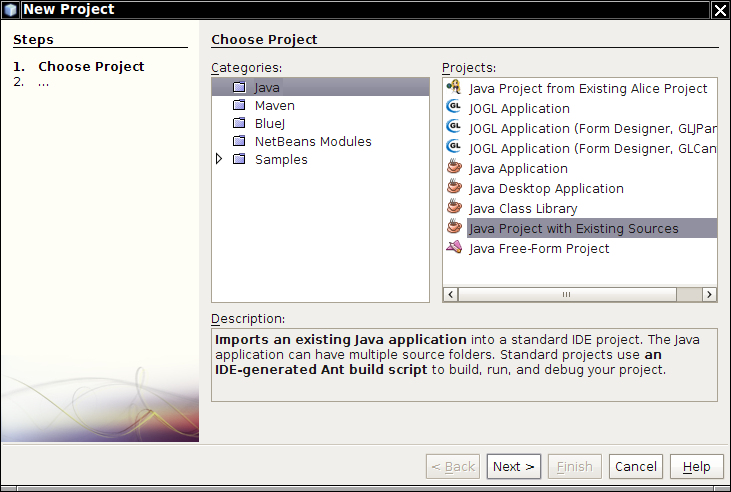
Give the project a name Lab1. Click on the Browse
button and select the lab1 directory. You want to select the directory
containing the src subdirectory, not the
src subdirectory itself. (You'll get a chance to fix the path
in the dialog after selecting the directory.)
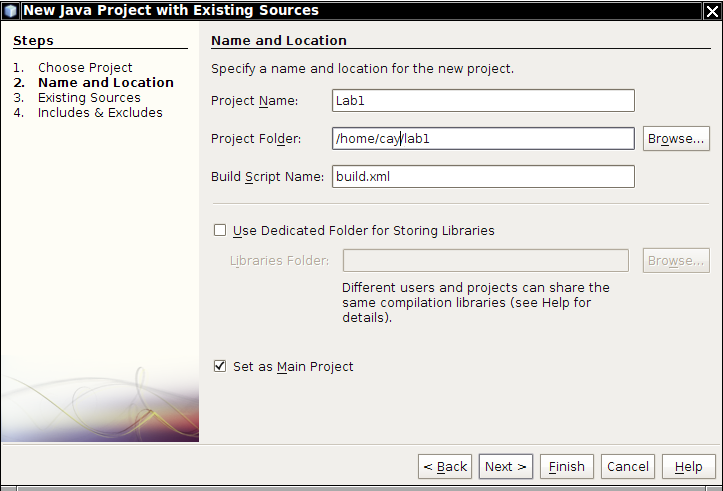
Click Next.
Click Add Folder next to the Source Package
Folders text area. Select the src folder inside the
lab1 folder.
Click Finish.
Which Java files are in your project? Which of them have a red ! next to them? Put the answer into your lab report.
Some code was left out from the sample program. You need to fill it in before you can run the program. We will do that in this lab.
What is the first error in the
ArrayListAddressBook class?
Look at the AddressBook interface. Which
method(s) does the ArrayListAddressBook class not
implement?
Scroll down to the end of the file and add a blank line before the
last }. Make a blank line and hit Ctrl+Space. Pick
remove from the menu.
What happens?
Save your file. What happened to the “abstract class” error message?
Note: We will supply a better implementation of the
removeEntry method in the next lab.
What other errors remain in the
ArrayListAddressBook class?
In which class do they need to be fixed?
Add private fields name, key, and
value in that class, all of type String.
Then move the cursor in a blank line below those fields and hit Ctrl+Space.
Select getName. Repeat, selecting getKey.
Repeat twice more to add getValue and
setValue.
What happens?
Now you know why we make you use NetBeans and not BlueJ. As you work with more sophisticated programs, you want all the support that you can get from a professional development environment.
Save all files (File →Save All from the menu). What error message do you get now?
You need to add an Item constructor. Go to the class, put
the cursor on a blank line, and hit Ctrl-Space.
Which option do you choose?
What code is generated when you choose it?
Your code should now be free from errors.
Look at the Projects window at the left side of the NetBeans window. The Lab1 project should be in boldface. If not, right-click and select Set as Main Project
Select Run → Run Main Project from the menu. What happens?
Right-click on <default-package> in the
Projects window and make a new class
AddressBookDemo. Add a main method
public static void main(String[] args)
{
   JFileChooser
}
then move the cursor next to JFileChooser and hit
Ctrl+Space.
What happens?
Continue editing the main method like this:
JFileChooser chooser = new JFi
Hit Ctrl+Space again.
What happens?
Continue editing the main method like this:
JFileChooser chooser = new JFileChooser();
int result = chooser.show
Hit Ctrl+Space again.
What happens?
Pick showOpenDialog. Continue editing the
main method like this:
JFileChooser chooser = new JFileChooser();
int result = chooser.showOpenDialog(null);
if (result == JFileChooser.)
Pick APPROVE_OPTION.
Continue editing the main method like this:
JFileChooser chooser = new JFileChooser();
int result = chooser.showOpenDialog(null);
if (result == JFileChooser.APPROVE_OPTION)
{
   String filename = chooser.getSelectedFile().getPath();
}
Where were you able to let NetBeans do the typing for you by strategic use of Ctrl+Space?
AddressBook
variable book and initialize it.
(Note that you declare the variable to be an interface. It is always a good idea to use interface variables. Of course, when you call the constructor, you must use a class.)
What is your code?
load method to load the file that was returned.Save this file as deptdir.txt
somewhere on your hard disk. Run the program (Run → Run Main
Project from the main menu). In the file chooser, navigate to
whereever you saved the deptdir.txt file, and click on
Open.
What happens next?
Add code to the program that looks up the phone number of your instructor. What is it?
Add code to the program that adds your email address to the address book, then save it. What is the code?
What happens when your program runs? (Look into the
deptdir.txt file.)
ArrayListAddressBook:
    public Item getFirst()
    {
        return Collections.min(items);
    }
What error do you get?
Tip: It's easiest to spot the errors when you open the Tasks window. (Choose Window -> Task from the menu.) Then click on the "filter" icon at the left of the Tasks window and make sure that Compiler Errors is checked in the Default Filter. Do it now!
Comparable interface or to make a Comparator
object. Let's do the interface.
Which class needs to implement it?
implements Comparable clause to that class. Save the
file.
What additional error do you get now?
compareTo method.
o to an Item otherString.compareTo. If the names
are different, return whatever String.compareTo
returned.value.compareTo(other.value).What is the code of your method?
At this point, all bugs should have gone away. Ignore warnings about
unchecked or unsafe operations—that's because we don't use
Comparable<Item>.
System.out.println(book.getFirst()) after
the call to book.load(filename).
What happens? Why?
(If nothing happens, you didn't declare book to have type
AddressBook. Retrace step E6 and fix it up.)
getFirst method to the interface. Your program
should now run without errors.
What does it print?
import java.util.ArrayList;

public class Util
{
   /**
      Returns the smallest element in an array
      @param values an array of non-null Comparable values of length >= 1
      @return the smallest value in values
   */
   public static Comparable smallest(Comparable[] values)
   {
      Comparable smallestSoFar = values[0];
      for (int i = 1; i < values.length; i++)
         if (values[i].compareTo(smallestSoFar) < 0)
            smallestSoFar = values[i];
      return smallestSoFar;
   }

   /**
      Returns the smallest element in the array that comes after a given value.
      @param values an array of non-null Comparable values
      @param after a value that may or may not be present in the array
      @return the smallest value in the array larger than value, or null if there isn't one
   */
   public static Comparable smallestAfter(Comparable[] values, Comparable after)
   {
      return null;
   }
}
Add the following method to AddressBook:
Item getNext(Item previous);
Add the implementation of that method in
ArrayListAddressBook. Remember to use Ctrl-Space.
Change the body to
      Item[] itemArray = new Item[items.size()];
      items.toArray(itemArray);
      Comparable result = Util.smallestAfter(itemArray, previous);
      return result;
There is an error in the body.
Why? How do you fix it?
Util.smallestAfter method.
Discuss with your buddy how you can do this. Write pseudocode on a piece of
paper. Write your and your buddy's name on the paper and turn it in after
the lab.
Pseudocode is just like Java code, except you can use words and phrases such as
if values[i] is less than values[j]
or
while i goes from 0 to the end
smallestAfter(values, 5)
where values contains the Integer objects 2,
6, 5, 4, 1, 7
Make a sheet for all the variables in your pseudocode, write their initial values, execute the steps in your mind, cross out values as they change and replace them with their new values.
Turn in your sheet after the lab.
What is it?
getFirst and getNext methods, print
the third item (in sorted order) in the address book.
What is it?