
This work is licensed under a Creative Commons Attribution-Noncommercial-Share Alike 3.0 United States License.
Copyright © Cay S. Horstmann 2010
This work is licensed under a Creative Commons Attribution-Noncommercial-Share Alike 3.0 United
States License.
See here.
Estimated time: Two 40-minute sessions
Maze that you can
initialize with a maze such as
         *****************************
         ** ***                      *
         ** *** * ********************
         ** *** *         *          *
         ** *** * *******   **********
         **     * ********************
         ****** ******* ******* ******
         ******         ******* ******
         *      ******* ******* ******
         * **** ******* **           *
         *    * ******* ******* ******
         * **** ******* ***     ******
         ************** **************
The * are walls, and the blank spaces are corridors. Each
corridor is one space wide (horizontally or vertically).
Given a row and column, how can you tell whether you are at an exit of a
given maze? (Using the Maze class, of course.)
Robot that lives in
a maze. Make a project with these classes and this MazeSolver class.
Your job is to complete the recursive escape method so that
the robot escapes the maze and prints the trail.
Start with the base case:
What is the code of your escape method so far?
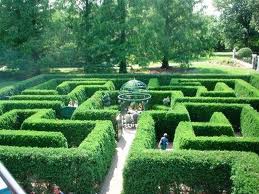
You may assume the robot has been placed with a wall to the right when it was constructed. Now go on:
(There is no point turning right? Why?)
You may have lost the wall to the right. Make a sketch (in ASCII art) showing how this can happen.
canMove). How can it check whether it has lost the wall?It must then again have a wall to the right. Why?
(You had to turn to see the wall.)
What is your code so far?
escape so
that it can escape from that position. That's your recursion.What is the complete code of your escape method?
MazeSolver program?escape2: Make the robot turn around in all four directions.
In each direction with a path emanating from it (i.e
canMove is true), the robot clones. Move the clone
into the path (one step), and let it escape.
Complete the loop:
public boolean escape2()
{
   if(atExit()) return false;
   for (int i = ...)
   {
      turnRight();
      if (...)
      {
         Robot cloned = clone();
         cloned....();
         if (cloned.escape2())
         {
            visited = ...
            return true;
         }
      }
   }
   return false;
}
What is your code?
What happens when you run the program? Remember to change the call in
the MazeRunner to escape2
         *****************************
         ** ***                      *
         ** *** * ********************
         ** *** *         *          *
         ** *** * *******   **********
         **     * ********************
         ****** ******* ******* ******
         ******         ******* ******
         *      ******* ******* ******
         * **** ******* **           *
         *    * ******* ******* ******
         * **** ******* ***     ******
         ************** **************
What happens?
escape with this
maze? Why?escape2 without recursion? Why or why
not?Let's try it with this method:
int triangleArea(int width)
{
   if (width == 1) return 1;
   int smallerArea = triangleArea(width - 1);
   int area = smallerArea + width;
   return area;
}
Make an index card like this:
triangleArea(width = 4)
smallerArea = triangleArea(3) ?
Now put this one aside and make another one for the call to
triangleArea(3). Put this one aside too, on the top of the
preceding one.
Keep going:
triangleArea(width = 2)
smallerArea = triangleArea(1) ?
When you reach triangleArea(1), the card looks
different:
triangleArea(width = 1)
return 1
Now find the card with the ? next to
triangleArea(1). Cross out the ? and write the
returned value 1 next to it. Now you can continue the
method:
triangleArea(width = 2)
smallerArea = triangleArea(1) = 1
area = 1 + 2 = 3
return 3
Do you have a card calling for triangleArea(2)? It's got to
be there somewhere. Cross out the ? and write 3 next to it.
Keep on going.
This activity should give you an idea of the stack of method calls that are pending as the recursion progresses.
What do you get for triangleArea(4) when all is done?
int largest(int[] values, int start, int res)
{
   if (start == values.length) return res;
   int res2 = Math.max(res, values[start]);
   return largest(values, start + 1, res2);
}
Let's study the call
largest(new int[] { 3, 4, 1 }, 0, Int.MIN_VALUE)
Make a card
largest(values = [3, 4, 1], start = 0, res = Int.MIN_VALUE)
res2 = ...
return largest(values, ..., ...) ?
What did you fill in for the ...?
?. We don't know the answer, so make a new card.
What is your card? largest(values = [3, 4, 1], start = 3, res = ...) return ...
What is ...?
You have just seen a “tail recursion”, in which the recursive call is the last item in the computation. These recursive calls can be automatically translated into loops, which gives you the best of both worlds—easy code and good performance.
RecursiveFib class is
from your text book.
Run the program with n = 50. What happens?
If you find it running too slowly, you can terminate it by clicking on the small x button at the bottom of the NetBeans window.

fib(42) = 267914296
fib(43) = 433494437
But that's weird. Given these two values, it is trivial to compute
fib(44). What is it? (Get out a calculator. Or if you don't
have one handy, use the calculator in Emacs. M-x quick-calc
Enter 267914296+433494437 Enter.)
fib method. Let's say we want
to step through fib(40). But it's called in a loop. We don't
want to click the "Step" button 40 times. That's where conditional
breakpoints come in.
Make a breakpoint on line 12. Right-click on it and select Breakpoint -> Properties. Click on “Break when hit count” and enter 40 after “equals to”.
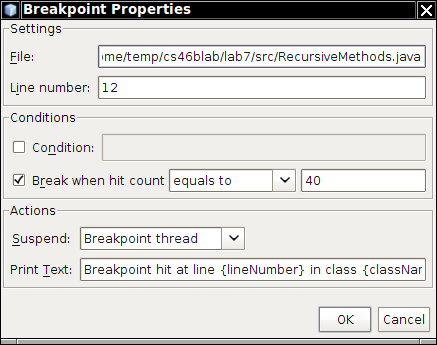
Now select Debug -> Debug Main Program. What happens?
long first = fib(n - 2);
Step into that call again. And keep clicking on the “Step Into”
button (or keep hitting the F7 key). Watch the call stack (Window ->
Debugging -> Call stack) and the variable display (Window ->
Debugging -> Variables). Describe what you see. What is n?
What is on the call stack?
It would be pretty tedious to keep stepping in all the way to the base case, so set a break point on line 27 and click the Continue button (or hit the F5 key).
How many invocations of fib are on the run time stack
now?
return 1 line and set a
breakpoint at the line
long result = first + second;
Click the Continue button (or hit the F5 key). What is the value of
n? What is the value that is about to be returned? (You may
need to click on the Variables tab to see the values of n,
first, and second.)
n,
first, and second, that you encounter. Do this
for at least ten values.In the previous section, you saw how to use the debugger for analyzing, and
that is often the best strategy. It is, however, not the strategy that students
use most commonly. Inexperienced programmers often sprinkle their code with
print statements like these:
System.out.println("Yoohoo! I got this far!");
System.out.println(n);
Print statements can waste a lot of your time. You put them in, you take them out, you put them back in, you comment them out, you remove the comments, and when it all works you take them out for good. Until the next bug appears and you wish you had left them in.
In this section, you will practice the use of logging statements.
Logging is easy. Instead of System.out.println, simply use
Logger.getGlobal().info. For example,
Logger.getGlobal().info("Entering fib. n=" + n);
Mac users (and others stuck on Java 6): Use
Logger.global.info instead of Logger.getGlobal().info
and live with the deprecation warning.
Logging is better than System.out.println for two reasons:
Logging can be better than using the debugger.
fib method. At appropriate places,
add the following logging statements:
Logger.getGlobal().info("Entering fib. n=" + n);;
Logger.getGlobal().info("Exiting fib. return=" + ...);;
What is the code for your fib method?
main method, add
Logger.getGlobal().setLevel(Logger.ALL);
Run your program (changing the upper limit of the loop in the
main method to a small enough value). What is the output?
knownFibonacciValues to the
class. In the fib method, first look up
knownFibonacciValues[n]. If it is non-zero, return it.
Otherwise, compute it in the normal way. Just before returning, call
knownFibonacciValues[n] = return value so that it is
know the next time.
What is the code of your method?
NMAX back to 50?setLevel call of the main method
to
Logger.getGlobal().setLevel(Level.OFF);
Run your program again. What happens?
Suppose you find another bug and want to turn logging back on. How do you do that?
In a small program, using Logger.getGlobal().info works fine. As your programs grow larger, you can control your logging in more sophisticated ways. You can use different logging levels. Instead of info, call methods severe for important messages or fine for "fine-grained" messages. Then call the setLevel method to set the level of the messages that you want to see in a particular program run. You can also define your own logger objects in addition to Logger.global. Keep this in the back of your mind; it will come in handy in the future.