
Remember applets? When Java was first introduced, applets were what excited everyone. No more desktop apps! Deliver code from the server!! Run it securely in the browser’s sandbox!!! That was then. Java 7 update 51, which was released January 14, 2014 will only run signed applets. If you still have any applets and haven’t gotten around to signing them, here is how.
When Sun Microsystems introduced Java in 1995, applets were considered the killer feature for the business success of Java. Don’t believe it? Check out this article. Imagine a boring business program with buttons and text fields, the kind that in 1995 had a Visual Basic frontend that connected to the backend database. What a nightmare that was. Whenever the app changed, the clients had to be redeployed on thousands of machines. With Java, the equivalent program would be hosted on a server, the user would visit a web page, the applet would be downloaded, and it would then run securely in the sandbox.
Of course, for that to happen, the sandbox had to be really secure. And in 1995, it was. There was discomfort by academic researchers who felt that the security model was pretty complex. This is a typical paper from that era. But nobody paid much attention since exploits were rare and quickly patched.
Of course, applets never were as prominent as originally envisioned. There are many reasons: machinations by Microsoft, the ubiquity of Flash, the rise of JavaScript, and the increasing sophistication of hackers who did exploit the weaknesses that the academics had grumbled about 15 years earlier. But there are lots of applets out there. In my line of work, teaching computer science, I see them all the time. For example, Professor Amruth Kumar has a nice site with exercises for Computer Science 101 students.
In fact, yesterday I headed to that site, and was greeted with this scary message:
So it has finally happened. I have a few blast-from-the-past applets on my home page, and the time has come to sign them. In case you are in the same boat, here is what you have to do.
Manifest-Version: 1.0
Permissions: sandbox
Or, if your app actually requires all permissions, and you previously used a self-signed certificate, use
Permissions: all-permissions instead. The jar command is something like
jar cvfm MyApplet.jar manifest.mf mypackage/*.classIn the
applet tag of your HTML file, add an attribute archive="MyApplet.jar".
jarsigner -keystore path/to/keystore.jks -tsa http://timestamp.comodoca.com/rfc3161 MyApplet.jar keyalias
So, I did all that and looked at my ancient applets with amazement. This traffic jam applet is as fascinating/depressing as ever. But the weather applet? Time has passed it by. Check out those pre-Swing list boxes!
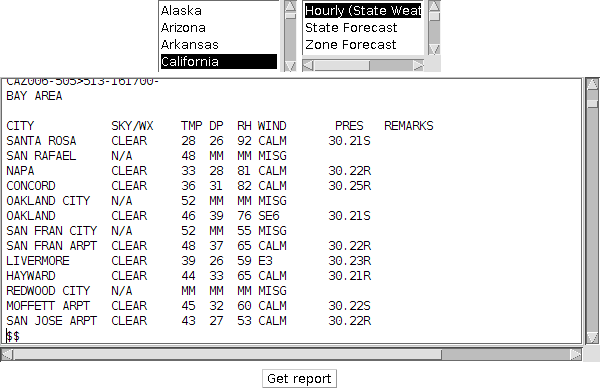
Then again, it is amazing that it is working at all. The Perl script from NOAA still produces a text report (now wrapped into some gratuitous HTML), and will hopefully continue to do so for all eternity, just like the transponder in 2001 that relayed the excavation of the lunar monolith, millions of years after it was put into place.
