CS 152 | Fall 2008 | Due Date: 2008-10-02 23:59
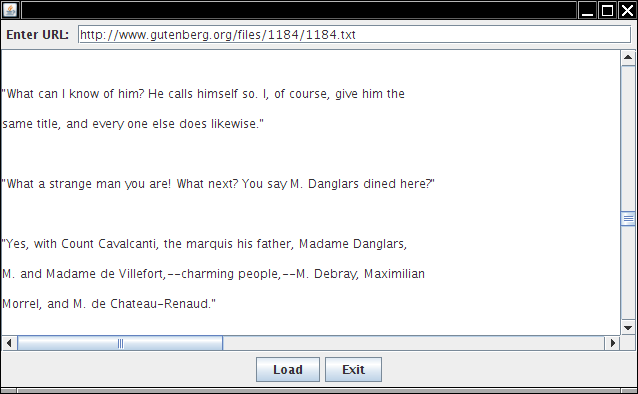
Consider this Scala program. It puts up a simple GUI for reading a file from a URL:
Type the URL into the text field, hit Load, and the file is loaded.
package hw2.problem1

object Main {

  def main(args: Array[String]) = {
    import javax.swing._
    import java.awt._
    import java.awt.event._
    import scala.io._

    // This makes an implicit conversion from a function to an action listener
    // We wouldn't need this if the Java API was functional
    implicit def makeAction(action : (ActionEvent)=>Unit) = new ActionListener {
      override def actionPerformed(event: ActionEvent) { action(event) }
    }

    val frame = new JFrame

    val textArea = new JTextArea(20, 50)
    val textField = new JTextField(50)
    val button1 = new JButton("Load")
    val button2 = new JButton("Exit")
    var count = 0

    button1.addActionListener((e : ActionEvent) => {
        for (line <- Source.fromURL(textField.getText).getLines) {
          textArea.append(line + "\n")
        }
      })

    button2.addActionListener((e : ActionEvent) => System.exit(0))

    val panel1 = new JPanel
    panel1.add(button1)
    panel1.add(button2)
    val panel2 = new JPanel
    panel2.add(new JLabel("Enter URL: "))
    panel2.add(textField)
    frame.add(panel2, BorderLayout.NORTH)
    frame.add(panel1, BorderLayout.SOUTH)
    frame.add(new JScrollPane(textArea))
    frame.pack()
    frame.setVisible(true)
  }
}
[If you are working on this before the 2008-09-23 lecture, just paste the
code inside the main method into the interpreter. The additional
scaffolding is required when we make the jump to an IDE.]
There is just one problem with this program. When you load a long file (such as The Count of Monte Cristo at http://www.gutenberg.org/files/1184/1184.txt), the UI appears frozen. The reason is simple. The action listener code doesn't return until the entire document is loaded, and no other event can be processed. In particular, the Exit button doesn't work.
This is bad. The remedy is to fire up a new thread and do the time-consuming task in that thread.
But threads strike fear in the hearts of many GUI programmers. Your task is
to implement a control structure doLater that makes it simple to
do some work in a new thread. When the programmer uses the construct
doLater { some actions }
a thread should be started, like this:
val background = new Thread(
  new Runnable() {
    def run() {
      some actions
    }
  });
background.start();
Define the doLater function and call it in the action listener
of button1.
10 points
Solve Part 2 of Lab 7, reproduced here for your convenience.
Enumeration<?> names = prop.propertyNames();
while (names.hasMoreElements()) {
   String name = names.nextElement().toString();
   String value = prop.getProperty(name);
   ... do something with name and value ...
}
In BGGA, implement a method so that one can call
forEachProperty(String name, String value : prop) {
   ... do something with name and value ...
}
Then try
forEachProperty(String name, String value : System.getProperties()) {
   System.out.println(name + "->" + value);
}
10 points
Define a class Poly that models a polynomial in one variable.
Polynomials are defined according to these rules:
Define case classes Const, X, Sum,
Prod and a function deriv(p : Poly) : Poly that
computes the derivative of a polynomial. For example,
val res = deriv(Sum(Prod(X(),X()),X())) // i.e. x*x + x
// sets res to Sum(Sum(Prod(X(),Const(1.0)),Prod(Const(1.0),X())),Const(1.0))
Define the classes as top-level classes in
hw2/problem3/Main.scala. (i.e. not inside the Main
object) Define deriv as a method of hw2.problem3.Main
(i.e. inside the Main object)
Enhance the program from lecture 10 so that
it parses Scala-style if expressions of the form
if (boolean expression) boolean or integer
expression else matching boolean or integer expression
You already have the grammar for integer expressions. A Boolean expression has the form
integer expression relational operator integer
expression
where the relational operator is one of == != < > <=
>=
Your program should read an expression from System.in and
display the parse tree (or an error if the expression is not well-formed).
Your task is to come up with a context-free grammar for an XML-like language. Tokens are
< > / = ident stringLiteral
The last two are defined in JavaTokenParsers.
An XML element must be closed, using one of the two alternative forms:
<ident> ... </ident>
or
<ident/>
(Note that the parser will not be able to verify whether the two
ident match in the first form.)
The first form may contain any number of child elements.
An element may contain any number of attributes, of the form
name1="value1" name2="value2"
Each name must be an identifier, and each value is a string literal.
Here are some acceptable inputs:
<a href="http://horstmann.com"/>
<project><target name="compile" verbose="yes"><javac/></target></project>
<project><target name="compile"><javac/></project></target>
<project><target name="compile"/><target name="run"/></project>
Here are some wrong inputs:
<root><123/></root>
<root name=value/>
<root 123="456"/>
<root><leaf></root>
Write a Scala program that implements a combinator parser for this language.
Your parser should read an expression from System.in and display
the parse tree (or an error if the expression is not well-formed).
Make a zip file with name hw2_lastname_firstname.zip,
substituting your own names (duh). The extension must be in lowercase. The file
must contain files hw2.problem1/Main.scala,
hw2/problem2/Main.java, etc., with exactly this directory
structure (i.e. hw2 being the first directory in the file). My
grading script
scalac hw2/problem1/Main.scala ; scala
    hw2.problem1.Main
etc. 5 points if you follow all of these instructions so that my grading script runs without requiring manual adjustments. Upload your solution to eCampus. You can submit as often as you like; only your last submission counts. Please note that eCampus will reject your submission after the due date.
For an additional 5 points, put your photo and bio onto eCampus. If it is there when the grader checks for it, you'll get those 5 points. (If for whatever reason you do not want to provide a photo of yourself, provide a photo of your laptop instead.) You were supposed to have received those 5 points last time, but the grader didn't give them to anyone.