Since the purpose of the inception phase is to get the buy-in of stakeholders, the purpose and scope description and summary/user level use cases should be done in that phase. Some functional/non-functional requirements may be needed for buy-in. The remainder should be completed early in the elaboration phase.
- Each step of a use case should make clear which actor is carrying out the action described in the step, and what is accomplished in the step. You should use active verbs in the present tense.
- Duration is the number of days between the start and end of a schedule task. Effort is that quantity multiplied by the (possibly fractional) number of people assigned to the task.
- The slack of a task in a schedule indicates by how much the task can be delayed without changing the final date.
- The three layers of a typical web application are the presentation, domain model, and persistence layer.
- The technique of adding markers to an HTML page in order to indicate the dynamically changing parts is described by the template view pattern.
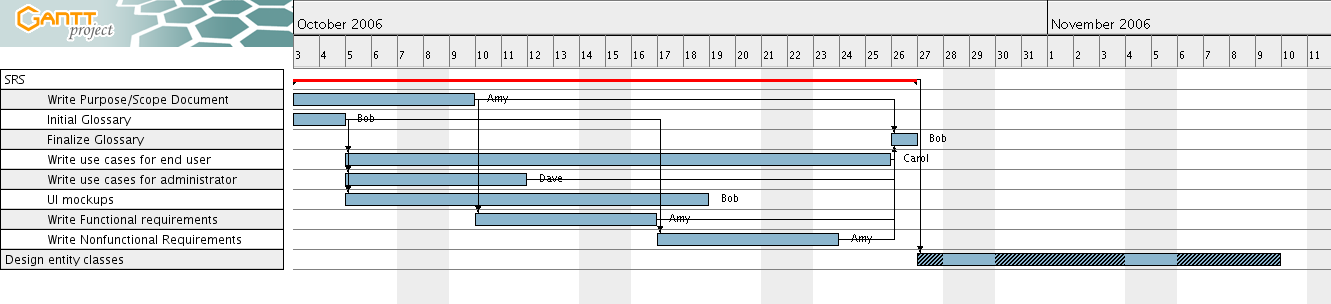
- Right now, Bob is overloaded. Resolve that problem by changing a
task link.
Add a link from "Initial Glossary" to "UI Mockups"
- Make a summary task "SRS" that contains all SRS tasks and make
the task "Design entity beans" a successor of that summary.
The trick is to use the four yellow arrows.
- A new developer, Dave, is added. Replace "Write Use Cases" with
two tasks "Write Use Cases for End User" (15 days) and "Write Use
Cases for Administrator (5 days). The tasks can work in parallel.
Make suitable resource assignments for these two tasks that don't
create overloads and minimize the schedule. Do not change other
resource assignments.
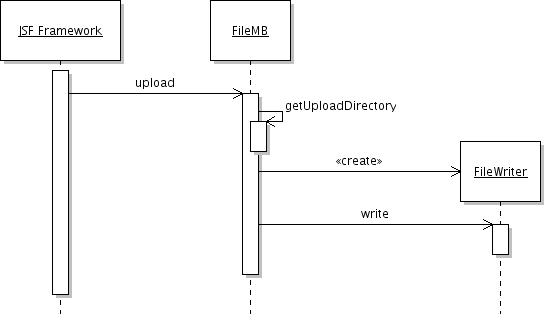
Produce a UML sequence diagram that denotes the following facts:
- When a user clicks the “Upload” button, the JSF framework calls the upload method of a bean of type FileMB. (If you use Violet, you may start with an implicit parameter labeled "JSF framework" since Violet doesn't support found messages.)
- The bean calls its own getUploadDirectory method
- The bean constructs a FileWriter object whose name is given by the upload directory and the name of the uploaded file (which the bean stores in an instance field)
- The bean calls the write method on the FileWriter to write the uploaded bytes.
However, this script assumes that the documentation exists in the base directory. Your job is to augment the script by checking out the documentation from CVS. You should assume that the documentation is on Oslo, in the CVS directory /home/cvsroot/sandbox/${team} with module name doc. Your team and user name are in build.properties. Look at the CVS task documentation, and place the task with appropriate attributes in an appropriate place in the script.
Feel free to try this out, html">homework 1. Your critique should address deficiencies (if they exist) in the following areas:
- Misuse of the use case template
- Misuse of defined terms (as given in the homework1 description)
- Level of detail
- Completeness
- Logical correctness of the steps and their order
This is like shooting fish in a barrel. Here are several possible answers. Two answers were sufficient for a full score.
- The rationale isn't one. It summarizes the use case rather than explaining why it is needed or what benefit it affords the actor.
- The Instructor isn't a user in this use case.
- The postcondition isn't useful. Every computer interaction leaves pixels on the screen. A useful postcondition would speak to the information that is available to other use cases.
- Terminology misuse in the precondition. The grader should be logged into the grading system, not the auto grader.
- Summary doesn't match the use case. The summary talks about assignments, whereas the use case discusses the grading of a single problem.
- Step 5 is incorrect. Grader should cause the system to do more than just compiling, namely running tests.
- The user interaction is terrible. How will the grader know the student IDs?
- . . .
- exam1.txt. The answers to problems 1, 2, 6.
- exam1.gan. The answer to problem 3.
- exam1.png. The answer to problem 4.
- build.xml. The answer to problem 5.
You will check your solution into your individual CVS sandbox, into a project entitled exam1. I will check out your work with the following commands:
export CVS_RSH=/usr/bin/ssh
export CVSROOT=:ext:username@oslo.cs.sjsu.edu:/home/cvsroot/sandbox/username
cvs checkout exam1