Linux Thinkpad T41p ( 2373-GEU
)
2006-07-27

The Hardware
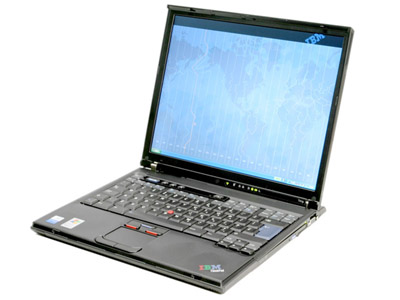
- Weight about 5.3 lbs.
- 1.7 GHz Pentium M
- 512 MB
- 14 inch display, SXGA (1400 x 1050)
- ATI FireGL Mobility 2 video
- 60 GB hard disk
- CD-RW/DVD ROM
- Atheros a/b/g WiFi
- Windows XP Professional
Ubuntu 6.10
I upgraded to Ubuntu 6.10, using the (not so) automatic mechanism.
I ran
gksu "update-manager -c"
I got a bizarre error message about a missing ubuntu-desktop
package, so I installed everything that was mentioned in the upgrade
instructions.
sudo apt-get install ubuntu-desktop
sudo apt-get install ubuntu-minimal ubuntu-standard
Somewhere along the way, I got an error message about failing to do
something with slocate. This
report shows how to fix the issue.
Then I ran
gksu "update-manager -c"
again. Everything went fine, except the X server didn't work when I
rebooted. This seems a common issue. I ran
sudo apt-get dpkg-reconfigure xserver-xorg
and chose all the defaults. X came up on my laptop screen but not the
external monitor.
I installed the fglrx driver, using Synaptic to search for
fglrx. I re-ran
sudo apt-get dpkg-reconfigure xserver-xorg
and selected the fglrx driver. I left everything else at the default.
Now the external monitor worked.
Was it a good upgrade experience? Well, it depends. A million things
could have broken, and they didn't. But surely the display could have been
handled a bit more gracefully.
BTW, you may want to check that there is enough room on /boot before
you start the upgrade. I got a scary warning that /boot was 98% full while
the upgrader was writing stuff onto it. I don't know what would have
happened if it had filled to 100%.
Ubuntu 6.06
My department is switching over to Ubuntu. I figured I should do the
same so I could feel the pain of my students. Here are my installation
experiences:
- I had to install from the "alternate" install disk since Fedora had
previously installed LVM. The alternate disk has a rather spartan
text-based installer (unlike the live disk), but, when properly
instructed, it reformatted /boot, /, and swap, and kept my /home
partition intact.
- It didn't detect my external monitor. I used EasyUbuntu to install the
ATI driver and ran
sudo aticonfig --initial --input=/etc/X11/xorg.conf
sudo aticonfig --resolution=0,1680x1050,1400x1050,1024x768
- The Atheros chip was detected automatically, and the network
configurator lets me configure the WEP key. There is just the teensy
detail that it still won't connect to the network. Oh well...nothing new
there. My ancient Lucent WaveLAN card works fine, as always.
I got
it to work, though, when I tried again with kernel 2.6.15-26, so keep on
trying after you update to the latest kernel. (After the update, I had
to manually install the latest madwifi kernel module, then modprobe
ath_pci, then run the network setup tool.)
- Installing VMWare 4.5 was a bit more complex. I had to
sudo apt-get install build-essential
sudo apt-get install linux-headers-2.6.15-23-386
I had to use the vmware-any-any patch.
- I then tried out the free VMPlayer, in the (unfulfilled) hope that I
wouldn't have to keep rebuilding the kernel. I got it to work with
bridged networking, after much fussing with Samba. Caution: DO NOT
install it together with VMWare 4.5. I had a heck of a time uninstalling
everything and then reinstalling just the player.
If vmplayer fails
after an update with the dreaded message
vmware is installed, but it has not been (correctly) configured
for this system. To (re-)configure it, invoke the following command:
/usr/bin/vmware-config.pl.
- Try to get the latest kernel module (in the multiverse)
- If the new kernel module isn't yet available (which sadly seems
to be the norm), follow these
instructions (auf Deutsch, aber hoffentlich kein Problem)
- Run /usr/bin/vmware-config-network.pl (not
vmware-config.pl)
- Infrared was no fun. (I use it to sync my ancient Palm V.)
- I had an conflict on IRQ 3 with the default COM1 IR port and the
PC card socket. (cat /proc/interrupts ) Sheesh...I thought
we went beyond that after all these years. Go to the BIOS and set
the IR port to COM3 = /dev/ttyS2 (port 3E8, IRQ 4). Run dmesg |
grep tty to check.
- Run dpkg-reconfigure irda-utils and configure as
native/nsc-ircc with parameters io=0x3e8 irq=4
- This
article has a further hint on setting
/etc/modprobe.d/local that probably does no harm and may
even help.
- Now the irda service comes up, but I can't use JPilot over
/dev/ttyS2. Remedy: Manually run modprobe
ircomm-tty. This magically creates /dev/ircomm*. Now
running irdadump shows that IR communication works, and
pilot-xfer -p /dev/ircomm0 -l lists the Pilot database. Set
the port in JPilot to /dev/ircomm0 and all will be ok.
- Realplayer sound worked after I turned off ESD in System ->
Preferences -> Sound.
Overall, installation and package management seem better than Fedora. I
am glad I switched.
Before I get snide comments from the Mac crowd, let me point out that,
on my PowerBook, I have equivalent grief with (1) Pilot IR sync (2) my HP
PSC750 printer that works perfectly on Linux and craps out on the Mac, (3)
many Java apps, and (4) Classic mode that works worse than VMWare for
running FrameMaker, my one remaining non-Linux app. The difference: On the
Mac, I just give up and live its shortcomings, erm, features.
Fedora Core 5
Ever the glutton for punishment, I installed Fedora Core 5 as soon as
it came out.
- Yum works better now. Simply run
rpm -ivh http://rpm.livna.org/livna-release-5.rpm
to
install the Livna repository; no more fussing with yum.conf.
- It took a week for the necessary kernel drivers to appear in Livna.
Note to self: Wait a week next time. Installation is easy:
yum install kmod-fglrx
yum install kmod-madwifi
- I accidentally got a Dell 2005FPW widescreen monitor with the
oddball resolution of 1680 x 1050. (I wanted 1600 x 1200.) I was about
to return it, but I decided to try it after reading this
discussion. The monitor works beautifully after adding the following
magic to xorg.conf:
Section "Monitor"
 Identifier
      "Monitor0"
 VendorName "Monitor Vendor"
 ModelName "LCD Panel
      1680x1050"
 HorizSync 3.0 - 83.0
 VertRefresh 56.0 -
      75.0
 ModeLine "1680x1050" 146.2 1680 1784 1968 2256 1050 1051 1054
      1087 -hsync -vsync
 Option "dpms"
EndSection
- External monitor support is the same festering mess as always.
Forget about switching resolutions on the fly. (There are tantalizing
tips how to do it here, here,
and here,
but they didn't work for me.) I still use a shell script to switch
xorg.conf files. I tried both the radeon and the fglrx drivers, and they
suck in different ways. The fglrx driver does a better job with dual
display--essential when using a projector. The following magic
incantations in xorg.conf have increased my chances of getting a dual
display (but by no means made it certain):
Section     "Device"
Identifier  "Videocard0"
Driver      "fglrx"
BoardName   "ATI FireGL Mobility T2"
Option      "VideoOverlay" "on"
Option      "DesktopSetup" "clone"
Option      "MonitorLayout" "TMDS"
Option      "PanelSize" "1680x1050"
Option      "ForceMonitors" "lvds,crt1"
EndSection
- Switching screens and dual screens work better with the latest ATI
driver. Run one of
aticonfig --enable-monitor lvds,crt1
aticonfig --enable-monitor lvds
aticonfig --enable-monitor crt1
- SELinux interfered with Flash--I deactivated it.
- The Thunderbird icon doesn't show. This
tip explains how to get it to work. The Emacs icon also doesn't
show. Change the launch command to emacs -i, and you get an
icon (the world's ugliest icon, for sure, but better than nothing).
- Madwifi works if you use the command-line instructions, but it does
not work with the system-config-network GUI. To enable the GUI, you need
to add an ath0 device. See these
instructions.
- I run VMWare 4.5. It works with the vmware-any-any patch. Thanks to
the anonymous genius who maintains it!
- I had to reboot once into Windows, to update the dual-boot settings.
Some malware popped up lots of Internet Explorer windows and tried to
install something that I am sure I don't want, crashing in the process.
I got out as quickly as I cound. (I had spent less than 10 hours in
Windows on this machine, and I used Internet Explorer twice: once to
install Firefox, and once to satisfy WiFi tech support at a hotel.
Apparently that was enough to catch the malware.) Linux may have its
problems, but that stuff is worse.
Conclusions
- My first Thinkpad laptop came
preloaded with Linux. It was great. My second Thinkpad was a pain to
install. The latest versions of Ubuntu and Fedora are much better.
- Wireless on Linux laptops is still sad. Without my ancient Lucent
WaveLAN card, I'd be hosed.
- Questions? Comments? Corrections? Please email me at cay@horstmann.com .